

Showing posts with label Autel MaxiTPMS TS601. Show all posts
Showing posts with label Autel MaxiTPMS TS601. Show all posts
Thursday, March 15, 2018
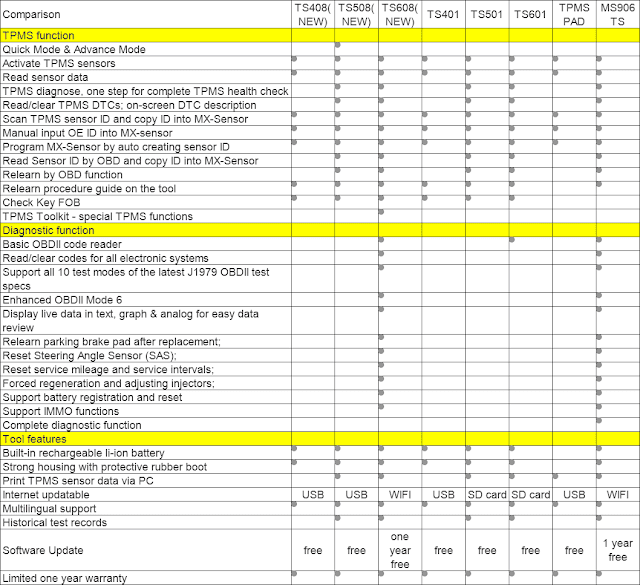
Autel TPMS TS408 vs. TS508 vs. TS608 vs. TS501 vs. MS906TS
Autel MaxiTPMS diagnostic and service tools table comparison, including Autel TS408,TS508,TS608, TS401,TS501,TS601, TPMS PAD and MaxiSys MS906TS.

Wednesday, April 12, 2017
Which Verison of Autel MaxiTPMS TPMS Tool to buy?
Which version of Autel MaxiTPMS TPMS Tool to buy, TS401,TS501 or TS601?
| Content | TS101 | Autel S401 | Autel TS501 | Autel S601 |
| Activate TPMS sensor | √ | √ | √ | √ |
| Receive 315 MHZ, 433.92 Mhz | √ | √ | √ | √ |
| Battery | 9V alkaline battery | Built-in rechargeable Li-polymer battery | Built-in rechargeable Li-polymer battery | Built-in rechargeable Li-polymer battery |
| Decode sensor data | √ | √ | √ | |
| Provide visual and audible response | √ | √ | √ | |
| Read sensor data | √ | √ | √ | |
| Check key fob transmissions | √ | √ | √ | |
| Save up to 5 TPMS records | √ | √ | √ | |
| Program Vehicle ECU | √ | √ | ||
| Read sensor IDs from vehicle ECU | √ | √ | ||
| Read/clear codes of TPM system | √ | √ | ||
| Reset TPMS malfunction light | √ | √ | ||
| On-screen code definitions | √ | √ | ||
| Display the replacement part number | √ | √ | ||
| Read TPMS live data | √ | |||
| Perform function/actuation tests | √ | |||
| Retrieve TPMS ECU information | √ | |||
| Support global OBDII diagnostics | √ | |||
| Single-tire-programming | √ | |||
| Multilingual-support | √ | √ | √ | |
| 1-year-free-upgrade | √ | √ | √ | √ |
Monday, April 10, 2017
Autel MaxiTPMS TS601 vs. MaxiSys MS906TS TMPS Tool
The purpose of the TPMS in vehicles is to warn drivers that at least one or more tires are significantly under-inflated, possibly creating unsafe driving conditions.
In low tire pressure condition, The TPMS indicator is a yellow symbol.
Why TPMS becomes so important in the world?
Even now, a substantial number of vehicles hit the road each day with underinflated tires. However, proper tire maintenance with the aid of a TPMS can and does help prevent many serious accidents.
Then, in response to a surge in accidents due to underinflated tires, the US government passed the Transportation Recall Enhancement, Accountability, and Documentation (TREAD) Act. One of the outcomes of this legislation is that vehicles sold in the United States since 2007 must include TMPS of some kind.
Below are most powerful TPMS Diagnostic and Service Tools in today’s market.
First TPMS tool is Autel MaxiTPMS TS601
It can fully diagnose TPMS problem, activate TPMS sensors and reprogramming the vehicle’s ECU. By working with 433MHz/315MHz MX-Sensor, this combination can solve all TPMS problems.
Second TPMS tool is newest Autel MaxiSys MS906TS
The MS906TS has an all-in-one exceptional OE-Level functionality from OBDII diagnostics, ECU coding to complete TPMS service. With this, Now technicians don’t need a second TPMS tool to trigger, relearn, or program MX-Sensor. Quickly test all vehicle systems by touching 8.0” screen tablet of the MS906TS.
What’s the difference between them?
| Compairsion | Autel MaxiTPMS TS601 | Autel MaxiSys MS906TS |
| Image |  |  |
| TPMS Function | ||
| Activate TPMS sensors | YES | YES |
| Read sensor data | YES | YES |
| Program new MX-sensor | YES | YES |
| Scan OE sensor ID and copy OE ID into MX-sensor | YES | YES |
| Manual input OE ID into MX-sensor | YES | YES |
| TPMS status, one page for all the information | YES | YES |
| program sensor by OBD function | YES | YES |
| Relearn by OBD function | YES | YES |
| Relearn procedure guide on the tool | YES | YES |
| Advanced function | ||
| OBD read/clear TPMS DTC | YES | YES |
| Read TPMS ECU information | YES | YES |
| Read TPMS live data | YES | YES |
| Reset engine light | YES | YES |
| Display I/M readiness status | YES | YES |
| On-Screen code definitions | YES | YES |
| Show OBDII live data graphing | YES | YES |
| Advanced diagnostic function | YES | YES |
| Check Key FOB | YES | YES |
| Tool features | ||
| Built-in rechargeable li-ion battery | YES | YES |
| Strong housing with protective rubber boot | YES | YES |
| Print TPMS sensor data via PC | YES | YES |
| Internet updatable | SD card | WIFI |
| Multilingual support | YES | YES |
| Historical test records | YES | YES |
| Software Update | Free | 1 year free |
Other difference is their configuration, MS906TS is Andriod based tablet diagnostic and TPMS Service tool with Samsung Exynos T5260 6-Core Processor, 2 GB RAM & 32 GB ROM which means MS906TS will run much faster than other similar tools.
Apart from this, MS906TS is Wireless TPMS & Advanced Diagnostics tool.
Enhanced wireless connectivity between the display tablet and VCI device allows greater mobility and ease at work. This also help you troubleshooting by professional technicans.
For more info about Autel TS601 and MS906TS, you can visit here:
MaxiTPMS TS601 link:
MaxiSysMS906TS link:
Friday, April 7, 2017
How to Program Porsche Cayenne 2010 TPMS via Autel MaxiTPMS TS601
Here is the test reports of how to use Autel MaxiTPMS TS601 TPMS service tool to troubleshoot and program Porsche Cayenne 2010 when the TPMS warning light is on, which may indicate low tire pressure or a broken sensor.

in order to solve the problem and turn off the warning light, we should activate the TPMS sensors using Autel TS601 MaxiTPMS scan tool
power up the Autel TS601

select TPMS from the main menu

select the make, model and year to enter the sensor activation screen (it’s Porsche Cayenne 2010-12)


take a walk around the car to each line and point Autel TS601 tool at the valve stem


then press trigger button

—> if the sensors are good and reading successful, the sensor info will be showed on the screen
in this case, the TPMS light is probably caused by the low tire pressure
check the test result on the TS601 to find out the tire with low pressure value


inflate the tire and the problem is solved

—> if the sensor is bad and reading unsuccessful, this may indicate the sensor is broken either mechanically or electronically

in this case, you need to replace sensor by cloning one with the original sensor id, or simply create a new one with a generated sensor id

there are 3 ways to clone a set of TMP sensors using Autel TS601 scanner and a MX-sensor
Method 1:
using TS601 to activate the broken OE sensor

directly to retrieve the sensor id

then program to the MX-sensor

Method 2:
it’s used when the original sensor is not transmitting any more

in this case, connect the MaxiTPMSTS601 scan tool to the vehicle by the TS601 OBDII cable


and retrieve the sensor id from the car system


unplug the TS601 from the car when learning is successful
insert the MX-sensor and program the copied id to the sensor to finish coding

Method 3:
it’s to manually input the original sensor id to Autel TS601


then program it to the MX-sensor

since the new sensors are programmed with the same original sensor id, install it in the same position on the wheel

no TPMS relearn procedure is needed after replacement
Note:
for busy shops where fast and volume production of copied or programmed sensors are greatly needed, the sensor programming accessory device MaxiTPMS Pad is the ideal solution for fast growing business. it performs sensor activation, copying and programming just in 3 steps. Very fast.

Enjoy!
Subscribe to:
Posts (Atom)